Page 12 - CanaDream 2025 TCA English
P. 12
BEFORE YOU GO
PARKING CANADREAM APP
Always park the RV on a level surface. This will ensure proper Enjoy all the benefits and discounts of
functioning of the fridge and appliances while in operation. the CanaDream Club as you design your
Canadian experience with us. Simply get our
Level parking also provides greater comfort in the coach, especially for new Web App and save it on your mobile
sleeping. Always apply the parking brake when parked. device home screen in a few easy steps.
Scan here:
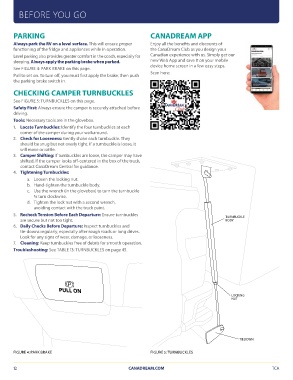
See FIGURE 4: PARK BRAKE on this page.
TURNBUCKLE
Pull to set on. To turn off, you must first apply the brake, then push BODY
the parking brake switch in.
CHECKING CAMPER TURNBUCKLES
See FIGURE 5: TURNBUCKLES on this page.
Safety First: Always ensure the camper is securely attached before
driving.
Tools: Necessary tools are in the glovebox.
1. Locate Turnbuckles: Identify the four turnbuckles at each
corner of the camper during your walkaround.
2. Check for Looseness: Gently shake each turnbuckle. They
should be snug but not overly tight. If a turnbuckle is loose, it
will move or rattle.
3. Camper Shifting: If turnbuckles are loose, the camper may have
shifted. If the camper looks off-centered in the box of the truck,
contact CanaDream Central for guidance.
4. Tightening Turnbuckles:
a. Loosen the locking nut.
b. Hand-tighten the turnbuckle body.
c. Use the wrench (in the glovebox) to turn the turnbuckle
¾ turn clockwise.
d. Tighten the lock nut with a second wrench,
avoiding contact with the truck paint.
5. Recheck Tension Before Each Departure: Ensure turnbuckles
are secure but not too tight.
6. Daily Checks Before Departure: Inspect turnbuckles and
tie-downs regularly, especially after rough roads or long drives.
Look for any signs of wear, damage, or looseness.
7. Cleaning: Keep turnbuckles free of debris for smooth operation.
Troubleshooting: See TABLE 13: TURNBUCKLES on page 45.
PULL ON LOCKING
NUT
FIGURE 4: PARK BRAKE FIGURE 5: TURNBUCKLES TIEDOWN
12 CANADREAM.COM
TCA
PARKING CANADREAM APP
Always park the RV on a level surface. This will ensure proper Enjoy all the benefits and discounts of
functioning of the fridge and appliances while in operation. the CanaDream Club as you design your
Canadian experience with us. Simply get our
Level parking also provides greater comfort in the coach, especially for new Web App and save it on your mobile
sleeping. Always apply the parking brake when parked. device home screen in a few easy steps.
Scan here:
See FIGURE 4: PARK BRAKE on this page.
TURNBUCKLE
Pull to set on. To turn off, you must first apply the brake, then push BODY
the parking brake switch in.
CHECKING CAMPER TURNBUCKLES
See FIGURE 5: TURNBUCKLES on this page.
Safety First: Always ensure the camper is securely attached before
driving.
Tools: Necessary tools are in the glovebox.
1. Locate Turnbuckles: Identify the four turnbuckles at each
corner of the camper during your walkaround.
2. Check for Looseness: Gently shake each turnbuckle. They
should be snug but not overly tight. If a turnbuckle is loose, it
will move or rattle.
3. Camper Shifting: If turnbuckles are loose, the camper may have
shifted. If the camper looks off-centered in the box of the truck,
contact CanaDream Central for guidance.
4. Tightening Turnbuckles:
a. Loosen the locking nut.
b. Hand-tighten the turnbuckle body.
c. Use the wrench (in the glovebox) to turn the turnbuckle
¾ turn clockwise.
d. Tighten the lock nut with a second wrench,
avoiding contact with the truck paint.
5. Recheck Tension Before Each Departure: Ensure turnbuckles
are secure but not too tight.
6. Daily Checks Before Departure: Inspect turnbuckles and
tie-downs regularly, especially after rough roads or long drives.
Look for any signs of wear, damage, or looseness.
7. Cleaning: Keep turnbuckles free of debris for smooth operation.
Troubleshooting: See TABLE 13: TURNBUCKLES on page 45.
PULL ON LOCKING
NUT
FIGURE 4: PARK BRAKE FIGURE 5: TURNBUCKLES TIEDOWN
12 CANADREAM.COM
TCA