Page 11 - CanaDream 2025 TCA English
P. 11
BEFORE YOU GO
PLAN YOUR ROUTE SOLIS WI-FI HOTSPOT
When planning your first day’s route and first night’s stop, Solis wi-fi hotspot devices are available for your convenience from
remember that it will take extra time to get accustomed to the CanaDream. Solis wi-fi hotspot is a helpful travel companion that
RV, secure your supplies and add fuel. For the first night, select a allows Internet access through Wi-Fi. Having internet access while
shorter drive in order to arrive before dusk. We recommend a drive on the road makes it easy to use GPS and language translators,
of no more than two hours if possible. which will assist you on your RV adventure.
Maps with routes to and from the CanaDream locations are
available, see CANADREAM LOCATIONS on page 46. Turn on the device:
FUELING THE RV 1. Press and hold the power button for 5 seconds.
2. Once the white circle is lit around the WIFI icon (not flashing),
Always fill the RV with the correct fuel, as labelled outside the fuel
tank. The capacity of the diesel tank is approximately 128L. the hotspot is ready to be connected.
It is your responsibility to ensure that DIESEL fuel is used in the
diesel engine. This unit has a DIESEL engine. Connect to device:
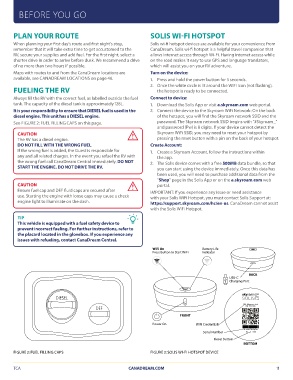
See FIGURE 2: FUEL FILLING CAPS on this page.
1. Download the Solis App or visit a.skyroam.com web portal.
CAUTION 2. Connect the device to the Skyroam WiFi Network: On the back
The RV has a diesel engine.
DO NOT FILL WITH THE WRONG FUEL. of the hotspot, you will find the Skyroam network SSID and the
If the wrong fuel is added, the Guest is responsible for password. The Skyroam network SSID begins with “#Skyroam_”
any and all related charges. In the event you refuel the RV with and password (Pw) is 8 digits. If your device cannot detect the
the wrong fuel call CanaDream Central immediately. DO NOT Skyroam WiFi SSID, you may need to reset your hotspot by
START THE ENGINE. DO NOT DRIVE THE RV. pressing the reset button with a pin on the back of your hotspot.
CAUTION Create Account:
Ensure fuel cap and DEF fluid caps are secured after
use. Starting the engine with loose caps may cause a check 1. Create a Skyroam Account, follow the instructions within
engine light to illuminate on the dash. the app.
TIP 2. The Solis device comes with a free 500MB data bundle, so that
This vehicle is equipped with a fuel safety device to you can start using the device immediately. Once this data has
prevent incorrect fueling. For further instructions, refer to been used, you will need to purchase additional data from the
the placard located in the glovebox. If you experience any “Shop” page in the Solis App or on the a.skyroam.com web
issues with refueling, contact CanaDream Central. portal.
IMPORTANT: If you experience any issue or need assistance
with your Solis WiFi Hotspot, you must contact Solis Support at:
https://support.skyroam.com/hc/en-us. CanaDream cannot assist
with the Solis WiFi Hotspot.
WiFi On Battery Life
Press Button to Start WiFi Indicator
BACK
USB-C
Charging Port
DIESEL DEF SSID: #Skyroam_abcd
PW: 12345678
FIGURE 2: FUEL FILLING CAPS Power On FRONT
TCA SN: srd114790a9y5vsc
WiFi Credentials reset
Serial Number
Reset Button BOTTOM
FIGURE 3: SOLIS WI-FI HOTSPOT DEVICE
CANADREAM.COM 11
PLAN YOUR ROUTE SOLIS WI-FI HOTSPOT
When planning your first day’s route and first night’s stop, Solis wi-fi hotspot devices are available for your convenience from
remember that it will take extra time to get accustomed to the CanaDream. Solis wi-fi hotspot is a helpful travel companion that
RV, secure your supplies and add fuel. For the first night, select a allows Internet access through Wi-Fi. Having internet access while
shorter drive in order to arrive before dusk. We recommend a drive on the road makes it easy to use GPS and language translators,
of no more than two hours if possible. which will assist you on your RV adventure.
Maps with routes to and from the CanaDream locations are
available, see CANADREAM LOCATIONS on page 46. Turn on the device:
FUELING THE RV 1. Press and hold the power button for 5 seconds.
2. Once the white circle is lit around the WIFI icon (not flashing),
Always fill the RV with the correct fuel, as labelled outside the fuel
tank. The capacity of the diesel tank is approximately 128L. the hotspot is ready to be connected.
It is your responsibility to ensure that DIESEL fuel is used in the
diesel engine. This unit has a DIESEL engine. Connect to device:
See FIGURE 2: FUEL FILLING CAPS on this page.
1. Download the Solis App or visit a.skyroam.com web portal.
CAUTION 2. Connect the device to the Skyroam WiFi Network: On the back
The RV has a diesel engine.
DO NOT FILL WITH THE WRONG FUEL. of the hotspot, you will find the Skyroam network SSID and the
If the wrong fuel is added, the Guest is responsible for password. The Skyroam network SSID begins with “#Skyroam_”
any and all related charges. In the event you refuel the RV with and password (Pw) is 8 digits. If your device cannot detect the
the wrong fuel call CanaDream Central immediately. DO NOT Skyroam WiFi SSID, you may need to reset your hotspot by
START THE ENGINE. DO NOT DRIVE THE RV. pressing the reset button with a pin on the back of your hotspot.
CAUTION Create Account:
Ensure fuel cap and DEF fluid caps are secured after
use. Starting the engine with loose caps may cause a check 1. Create a Skyroam Account, follow the instructions within
engine light to illuminate on the dash. the app.
TIP 2. The Solis device comes with a free 500MB data bundle, so that
This vehicle is equipped with a fuel safety device to you can start using the device immediately. Once this data has
prevent incorrect fueling. For further instructions, refer to been used, you will need to purchase additional data from the
the placard located in the glovebox. If you experience any “Shop” page in the Solis App or on the a.skyroam.com web
issues with refueling, contact CanaDream Central. portal.
IMPORTANT: If you experience any issue or need assistance
with your Solis WiFi Hotspot, you must contact Solis Support at:
https://support.skyroam.com/hc/en-us. CanaDream cannot assist
with the Solis WiFi Hotspot.
WiFi On Battery Life
Press Button to Start WiFi Indicator
BACK
USB-C
Charging Port
DIESEL DEF SSID: #Skyroam_abcd
PW: 12345678
FIGURE 2: FUEL FILLING CAPS Power On FRONT
TCA SN: srd114790a9y5vsc
WiFi Credentials reset
Serial Number
Reset Button BOTTOM
FIGURE 3: SOLIS WI-FI HOTSPOT DEVICE
CANADREAM.COM 11