Page 15 - CanaDream 2025 TCA English
P. 15
DRIVING & MANEUVERING THE RV
MAINTAINING THE RV WHEN CAUTION
TRAVELLING Cruise control may make operation more relaxing. However,
please do not use cruise control on wet, slippery or snow-covered
FUELING THE RV roads or while traveling on hilly/mountainous terrain. Using cruise
control in these conditions may result in reduced driver control
Before filling the RV fuel tank see FIGURE 2: FUEL FILLING CAPS on and will be less fuel efficient. Under these circumstances using tow
page 11: haul will provide improved driving control.
1. Turn the engine OFF and apply the parking brake.
2. Turn the battery disconnect switch to the OFF position and TOW/HAUL
close both propane gas bottle shutoff valves. See FIGURE 9: CanaDream strongly recommends the use of TOW/HAUL for
PROPANE TANKS & BOTTLE SELECTOR on page 16. additional control in light braking applications.. It is especially
3. After fueling, turn the battery disconnect switch to the ON useful for descending hills and slowing a heavy RV. Tow/haul
position and open the propane gas shutoff valve on the automatically downshifts the transmission when the brakes are
selected bottle. applied to maintain the desired speed without constant braking. To
4. Check/re-light the fridge. See FIGURE 23: FRIDGE PANEL on become more familiar with the Tow/haul function we recommend
page 33. that you engage it when you first encounter when descending a hill
that requires speed control.
FUEL REMINDER
Once activated, when braking, press and release the pedal, do not
You must return the RV with the same fuel level that you received at apply the brake pedal continuously as this may overheat the brake
pickup. system. Allow the engine and Tow/haul to do the work.
UNDER THE HOOD Style 1 – using button:
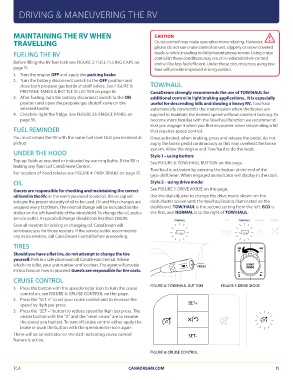
Top up fluids as required or indicated by warning lights. If the RV is See FIGURE 6: TOW/HAUL BUTTON on this page.
leaking any fluid call CanaDream Central.
Tow/haul is activated by pressing the button at the end of the
For location of hood release see FIGURE 4: PARK BRAKE on page 12. gear-shift lever. When engaged an indicator will display in the dash.
OIL Style 2 – using drive mode:
Guests are responsible for checking and maintaining the correct See FIGURE 7: DRIVE MODE on this page.
oil level in the RV. In the event you need to add oil, the oil cap will
indicate the proper viscosity of oil to be used. Oil and filter changes are Use the dial adjuster to change the drive mode shown on the
required every 12,000km. The next oil change will be indicated on the dash cluster screen until the tow/haul icon is illuminated on the
sticker on the left-hand side of the windshield. To change the oil, seek a dashboard. TOW/HAUL is the second setting from the left. ECO is
service outlet. A typical oil change should cost less than $150.00. the first, and NORMAL is to the right of TOW/HAUL.
Save all receipts for adding or changing oil. CanaDream will TOW/HAUL ECO TOW/HAUL NORMAL SLIPPERY
reimburse you for those receipts. If the service outlet recommends
any extra services, call CanaDream Central before proceeding. PRESS 2H 4H
TIRES FIGURE 6: TOW/HAUL BUTTON DRIVE
MODE
Should you have a flat tire, do not attempt to change the tire SET+
yourself. Park in a safe place and call CanaDream Central. Advise 4L
which tire is flat, your unit number and location. The agent will provide
instructions on how to proceed. Guests are responsible for tire costs. FIGURE 7: DRIVE MODE
CRUISE CONTROL SET–
1. Press the button with the speedometer icon to turn the cruise
control on, see FIGURE 8: CRUISE CONTROL on this page.
2. Press the “SET +” to set your cruise control and to increase the
speed by 1kph per press.
3. Press the “SET –“ button to reduce speed by 1kph per press. The
center button with the “X” and the “reset arrow” are to resume
the speed you had set. To turn off cruise control either apply the
brake or push the button with the speedometer icon again.
There will be an indicator on the dash indicating cruise control
feature is active.
FIGURE 8: CRUISE CONTROL
TCA CANADREAM.COM 15
MAINTAINING THE RV WHEN CAUTION
TRAVELLING Cruise control may make operation more relaxing. However,
please do not use cruise control on wet, slippery or snow-covered
FUELING THE RV roads or while traveling on hilly/mountainous terrain. Using cruise
control in these conditions may result in reduced driver control
Before filling the RV fuel tank see FIGURE 2: FUEL FILLING CAPS on and will be less fuel efficient. Under these circumstances using tow
page 11: haul will provide improved driving control.
1. Turn the engine OFF and apply the parking brake.
2. Turn the battery disconnect switch to the OFF position and TOW/HAUL
close both propane gas bottle shutoff valves. See FIGURE 9: CanaDream strongly recommends the use of TOW/HAUL for
PROPANE TANKS & BOTTLE SELECTOR on page 16. additional control in light braking applications.. It is especially
3. After fueling, turn the battery disconnect switch to the ON useful for descending hills and slowing a heavy RV. Tow/haul
position and open the propane gas shutoff valve on the automatically downshifts the transmission when the brakes are
selected bottle. applied to maintain the desired speed without constant braking. To
4. Check/re-light the fridge. See FIGURE 23: FRIDGE PANEL on become more familiar with the Tow/haul function we recommend
page 33. that you engage it when you first encounter when descending a hill
that requires speed control.
FUEL REMINDER
Once activated, when braking, press and release the pedal, do not
You must return the RV with the same fuel level that you received at apply the brake pedal continuously as this may overheat the brake
pickup. system. Allow the engine and Tow/haul to do the work.
UNDER THE HOOD Style 1 – using button:
Top up fluids as required or indicated by warning lights. If the RV is See FIGURE 6: TOW/HAUL BUTTON on this page.
leaking any fluid call CanaDream Central.
Tow/haul is activated by pressing the button at the end of the
For location of hood release see FIGURE 4: PARK BRAKE on page 12. gear-shift lever. When engaged an indicator will display in the dash.
OIL Style 2 – using drive mode:
Guests are responsible for checking and maintaining the correct See FIGURE 7: DRIVE MODE on this page.
oil level in the RV. In the event you need to add oil, the oil cap will
indicate the proper viscosity of oil to be used. Oil and filter changes are Use the dial adjuster to change the drive mode shown on the
required every 12,000km. The next oil change will be indicated on the dash cluster screen until the tow/haul icon is illuminated on the
sticker on the left-hand side of the windshield. To change the oil, seek a dashboard. TOW/HAUL is the second setting from the left. ECO is
service outlet. A typical oil change should cost less than $150.00. the first, and NORMAL is to the right of TOW/HAUL.
Save all receipts for adding or changing oil. CanaDream will TOW/HAUL ECO TOW/HAUL NORMAL SLIPPERY
reimburse you for those receipts. If the service outlet recommends
any extra services, call CanaDream Central before proceeding. PRESS 2H 4H
TIRES FIGURE 6: TOW/HAUL BUTTON DRIVE
MODE
Should you have a flat tire, do not attempt to change the tire SET+
yourself. Park in a safe place and call CanaDream Central. Advise 4L
which tire is flat, your unit number and location. The agent will provide
instructions on how to proceed. Guests are responsible for tire costs. FIGURE 7: DRIVE MODE
CRUISE CONTROL SET–
1. Press the button with the speedometer icon to turn the cruise
control on, see FIGURE 8: CRUISE CONTROL on this page.
2. Press the “SET +” to set your cruise control and to increase the
speed by 1kph per press.
3. Press the “SET –“ button to reduce speed by 1kph per press. The
center button with the “X” and the “reset arrow” are to resume
the speed you had set. To turn off cruise control either apply the
brake or push the button with the speedometer icon again.
There will be an indicator on the dash indicating cruise control
feature is active.
FIGURE 8: CRUISE CONTROL
TCA CANADREAM.COM 15